
Every business has tasks that repeat every day: replying to the same questions, copying leads into a spreadsheet, sending reminders, posting on social media. None of them are hard, but together they eat hours that could go into sales, clients or creative work. AI automation takes these repetitive tasks off your plate, and today you do not need to be a programmer to set it up.
What is AI automation?
Automation means connecting your apps so that work happens on its own when something occurs. AI automation adds a smart step in the middle: instead of only moving data, the workflow can read, write, summarise or decide, using an AI model.
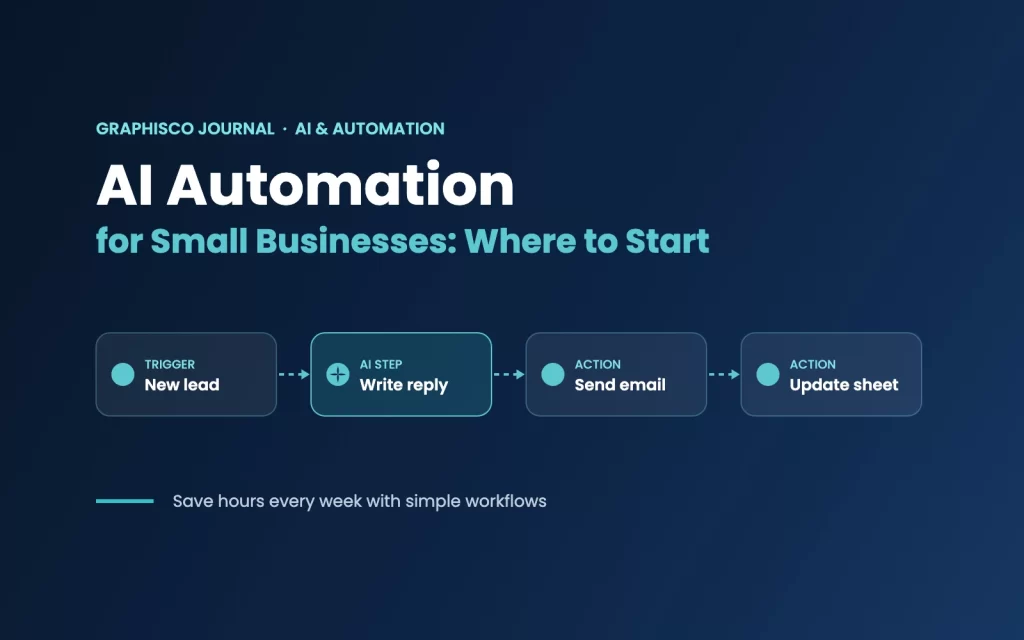
Most automations follow the same simple pattern:
- Trigger: something happens, such as a new form submission, email or order.
- AI step: AI reads the information and does something useful with it, such as writing a reply or sorting the request.
- Actions: the result is sent where it needs to go, such as an email, WhatsApp message, spreadsheet or CRM.
Automation vs AI automation
Classic automation follows fixed rules: “when a form is submitted, add a row to the sheet”. AI automation can handle messier, human tasks: “read this enquiry, work out what the customer wants, and draft a friendly reply in our tone”. The two work best together.
7 tasks small businesses can automate today
- Lead replies: answer new website or social media enquiries within minutes with a personalised first reply.
- Lead tracking: save every enquiry to a Google Sheet or CRM automatically, so nothing gets lost.
- Email sorting: label incoming emails as sales, support or invoices and send a short summary each morning.
- Social media content: turn one blog post into captions for Instagram, Facebook and LinkedIn, ready for review.
- Appointment reminders: send booking confirmations and reminders by email or WhatsApp.
- Reports: collect weekly numbers from different tools into one simple summary.
- Customer feedback: send a review request after a project and collect the answers in one place.
Popular tools to get started
You can build automations with no-code tools that use visual, drag-and-drop workflows:
- n8n: a flexible workflow tool that can be self-hosted, with strong AI features. A great choice if you want more control and lower running costs.
- Zapier: very beginner-friendly, with thousands of ready app connections.
- Make: a visual builder that is good for more detailed, multi-step workflows.
All three can connect to AI models, Google Workspace, email, social media and many other apps you already use.
How to start, step by step
- List your repetitive tasks. Write down what you or your team do again and again every week.
- Pick one small, clear task. Start with something simple, like saving leads to a sheet.
- Map the steps. Write the trigger, the AI step and the final actions on paper first.
- Build and test. Create the workflow and test it with real examples before switching it on.
- Keep a human check. For anything customers will see, review AI-written messages at the start.
- Improve and expand. Once one workflow saves time, automate the next task.
Mistakes to avoid
- Automating everything at once. Start small and grow step by step.
- Letting AI send without checks. Review customer-facing messages until you trust the results.
- Ignoring privacy. Be careful with customer data, passwords and payment details, and only connect apps you trust.
- Forgetting to maintain it. Apps change over time, so check your workflows regularly.
Learn AI automation with GraphUp
We use automation and AI in our own studio work, and we teach it too. GraphUp, the learning platform of Graphisco, offers a practical AI Automation course where you learn to build real workflows with tools like n8n, step by step, online, in person in Lahore or through Minhaj University (DODL).
You can also read how we use AI in our own work in How We Use Claude AI to Build and Manage Our Website, and take the next step with Agentic AI Explained: How AI Agents Move from Answers to Action.
چھوٹے کاروباروں کے لیے اے آئی آٹومیشن: یہ کیا ہے اور کہاں سے شروع کریں
ہر کاروبار میں کچھ کام روز دہرائے جاتے ہیں: ایک جیسے سوالوں کے جواب دینا، لیڈز کو اسپریڈ شیٹ میں کاپی کرنا، ریمائنڈرز بھیجنا، سوشل میڈیا پر پوسٹ کرنا۔ ان میں سے کوئی بھی مشکل نہیں، مگر سب مل کر وہ گھنٹے کھا جاتے ہیں جو سیلز، کلائنٹس یا تخلیقی کام پر لگ سکتے تھے۔ اے آئی آٹومیشن یہ دہرائے جانے والے کام آپ کے ذمے سے ہٹا دیتی ہے، اور آج اسے سیٹ کرنے کے لیے پروگرامر ہونا ضروری نہیں۔
اے آئی آٹومیشن کیا ہے؟
آٹومیشن کا مطلب ہے اپنی ایپس کو اس طرح جوڑنا کہ کچھ ہونے پر کام خود بخود ہو جائے۔ اے آئی آٹومیشن درمیان میں ایک سمجھدار قدم شامل کرتی ہے: صرف ڈیٹا منتقل کرنے کے بجائے ورک فلو اے آئی ماڈل کی مدد سے پڑھ، لکھ، خلاصہ بنا یا فیصلہ کر سکتا ہے۔
زیادہ تر آٹومیشنز ایک ہی سادہ ترتیب پر چلتی ہیں:
- ٹریگر: کچھ ہوتا ہے، جیسے نیا فارم، ای میل یا آرڈر۔
- اے آئی قدم: اے آئی معلومات پڑھتا ہے اور اس کے ساتھ کوئی مفید کام کرتا ہے، جیسے جواب لکھنا یا درخواست کو ترتیب دینا۔
- ایکشنز: نتیجہ وہاں بھیج دیا جاتا ہے جہاں اسے جانا ہے، جیسے ای میل، واٹس ایپ میسج، اسپریڈ شیٹ یا سی آر ایم۔
عام آٹومیشن اور اے آئی آٹومیشن میں فرق
عام آٹومیشن طے شدہ اصولوں پر چلتی ہے: “فارم جمع ہو تو شیٹ میں ایک لائن شامل کرو”۔ اے آئی آٹومیشن زیادہ الجھے ہوئے، انسانی کام بھی سنبھال سکتی ہے: “یہ انکوائری پڑھو، سمجھو کہ گاہک کیا چاہتا ہے، اور ہمارے انداز میں ایک دوستانہ جواب لکھو”۔ دونوں مل کر سب سے اچھا کام کرتی ہیں۔
۷ کام جو چھوٹے کاروبار آج ہی آٹومیٹ کر سکتے ہیں
- لیڈز کو جواب: ویب سائٹ یا سوشل میڈیا کی نئی انکوائریز کو چند منٹ میں ذاتی انداز کا پہلا جواب۔
- لیڈز کا ریکارڈ: ہر انکوائری خود بخود گوگل شیٹ یا سی آر ایم میں محفوظ، تاکہ کچھ ضائع نہ ہو۔
- ای میلز کی ترتیب: آنے والی ای میلز کو سیلز، سپورٹ یا انوائس کے لیبل دیں اور ہر صبح ایک مختصر خلاصہ بھیجیں۔
- سوشل میڈیا کانٹینٹ: ایک بلاگ پوسٹ کو انسٹاگرام، فیس بک اور لنکڈ اِن کے کیپشنز میں بدلیں، ریویو کے لیے تیار۔
- اپائنٹمنٹ ریمائنڈرز: بکنگ کی تصدیق اور ریمائنڈرز ای میل یا واٹس ایپ پر بھیجیں۔
- رپورٹس: مختلف ٹولز سے ہفتہ وار اعداد ایک سادہ خلاصے میں اکٹھے کریں۔
- گاہکوں کا فیڈبیک: پراجیکٹ کے بعد ریویو کی درخواست بھیجیں اور جوابات ایک جگہ جمع کریں۔
شروع کرنے کے لیے مقبول ٹولز
آپ نو کوڈ ٹولز کے ساتھ آٹومیشنز بنا سکتے ہیں جن میں ورک فلوز تصویری اور ڈریگ اینڈ ڈراپ انداز میں بنتے ہیں:
- n8n: ایک لچکدار ورک فلو ٹول جسے اپنے سرور پر بھی چلایا جا سکتا ہے، اور جس کے اے آئی فیچرز مضبوط ہیں۔ اگر آپ زیادہ کنٹرول اور کم خرچ چاہتے ہیں تو بہترین انتخاب۔
- زیپیئر (Zapier): نئے لوگوں کے لیے بہت آسان، ہزاروں ایپس کے ساتھ تیار کنکشنز۔
- میک (Make): تصویری بلڈر جو زیادہ تفصیلی، کئی مراحل والے ورک فلوز کے لیے اچھا ہے۔
تینوں اے آئی ماڈلز، گوگل ورک اسپیس، ای میل، سوشل میڈیا اور ان بہت سی ایپس سے جڑ سکتے ہیں جو آپ پہلے سے استعمال کرتے ہیں۔
قدم بہ قدم کیسے شروع کریں
- دہرائے جانے والے کاموں کی فہرست بنائیں۔ لکھیں کہ آپ یا آپ کی ٹیم ہر ہفتے بار بار کیا کرتی ہے۔
- ایک چھوٹا اور واضح کام چنیں۔ کسی آسان کام سے شروع کریں، جیسے لیڈز کو شیٹ میں محفوظ کرنا۔
- مراحل کا نقشہ بنائیں۔ پہلے کاغذ پر ٹریگر، اے آئی قدم اور آخری ایکشنز لکھیں۔
- بنائیں اور ٹیسٹ کریں۔ ورک فلو بنائیں اور چلانے سے پہلے اصل مثالوں کے ساتھ ٹیسٹ کریں۔
- انسانی جانچ رکھیں۔ جو چیز گاہک دیکھیں گے، شروع میں اے آئی کے لکھے پیغامات خود ریویو کریں۔
- بہتر کریں اور بڑھائیں۔ جب ایک ورک فلو وقت بچانے لگے تو اگلا کام آٹومیٹ کریں۔
غلطیاں جن سے بچنا چاہیے
- سب کچھ ایک ساتھ آٹومیٹ کرنا۔ چھوٹے سے شروع کریں اور قدم بہ قدم بڑھیں۔
- بغیر جانچ کے اے آئی کو بھیجنے دینا۔ جب تک نتائج پر بھروسہ نہ ہو، گاہکوں کو جانے والے پیغامات ریویو کریں۔
- رازداری کو نظر انداز کرنا۔ گاہکوں کے ڈیٹا، پاس ورڈز اور ادائیگی کی تفصیلات میں احتیاط کریں، اور صرف قابل اعتماد ایپس جوڑیں۔
- دیکھ بھال بھول جانا۔ ایپس وقت کے ساتھ بدلتی ہیں، اس لیے اپنے ورک فلوز باقاعدگی سے چیک کریں۔
گراف اپ کے ساتھ اے آئی آٹومیشن سیکھیں
ہم اپنے اسٹوڈیو کے کام میں آٹومیشن اور اے آئی استعمال کرتے ہیں، اور اسے پڑھاتے بھی ہیں۔ گرافسکو کا لرننگ پلیٹ فارم گراف اپ ایک عملی اے آئی آٹومیشن کورس پیش کرتا ہے، جہاں آپ n8n جیسے ٹولز کے ساتھ قدم بہ قدم حقیقی ورک فلوز بنانا سیکھتے ہیں: آن لائن، لاہور میں ان پرسن یا منہاج یونیورسٹی (DODL) کے ذریعے۔
آپ یہ بھی پڑھ سکتے ہیں کہ ہم اپنے کام میں اے آئی کیسے استعمال کرتے ہیں: ہم اپنی ویب سائٹ بنانے اور سنبھالنے کے لیے کلاڈ اے آئی کیسے استعمال کرتے ہیں، اور اگلا قدم اٹھائیں: ایجنٹک اے آئی کیا ہے۔